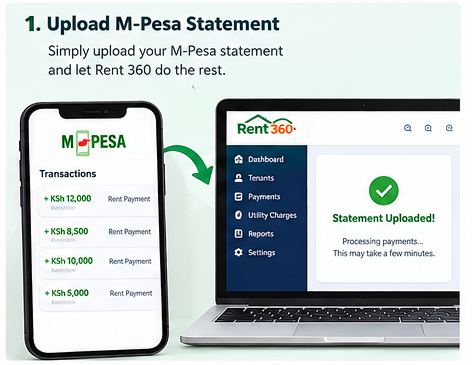
1. Start with the M-Pesa statement
Bring payment transactions together as the starting point for checking and organising rental income.

Smart Invoices helps businesses generate digital invoices, track inventory levels automatically, monitor pending client balances, and maintain real-time sales analytics straight from your mobile phone or PC.
Still writing manual receipts and struggling with stock reconciliation? Modernise your business workflow today.
Turn sales entries into a clearer picture of your daily revenue, inventory status and receivables.
Smart Invoices presents digital invoicing and business record-keeping tools for businesses that need professional invoices, stock tracking, transaction summaries and staff access controls.
Generate, download, and send clean, customized PDF invoices in seconds from your mobile phone or PC.
Every invoice includes a tamper-proof QR code to ensure digital authenticity for customers.
Keep a clear view on your revenues, track sales trends, and monitor unpaid client balances.
Stock deductions occur automatically as sales are made, preventing stockouts.
Stay informed about important business transactions wherever you are.
Assign roles to team members while maintaining absolute control over sensitive figures.
Designed for speed so your staff can process transactions without friction:
What happens automatically upon submission?
Get instant insights into your daily operations from a streamlined dashboard:
Example Scenario: A staff member sells 10 units of an item for KSh 5,000.
Rent 360 is designed for landlords and property managers who want a clearer, more organised way to manage rental income. Instead of manually checking M-Pesa messages, writing receipts in books and updating multiple spreadsheets, use your M-Pesa statement as the starting point for structured tenant payment records and useful reports. Review the transactions, match payments to tenants, and keep your rental information in one place.
Use your M-Pesa statement to help organise incoming rent payments and match transactions to the appropriate tenants. This reduces repetitive manual entry and makes it easier to identify payments that need checking.
Keep rental payment information organised by tenant and property. Quickly review the payments recorded for a tenant instead of searching through long M-Pesa messages or handwritten books.
See which rent payments have been recorded, identify outstanding balances and follow up on arrears with better information. A clear record helps you have more accurate conversations with tenants.
Support clearer communication with tenants through SMS payment receipts or confirmations, helping tenants keep track of payments made. Availability and messaging arrangements can be confirmed during the product demonstration.
Keep utility charges and payments alongside rental records. This helps you review rent and utility balances without mixing different charges together.
Generate structured rent-management reports to review rental income, tenant payments and balances. Reports can be prepared in practical formats such as PDF or Excel for sharing and record keeping.
Rent 360 is intended to make the rent-recording process easier to follow, from transaction statement to useful rental report. The statement is the starting point; payment-to-tenant matching and any transactions needing clarification should be reviewed for accuracy.
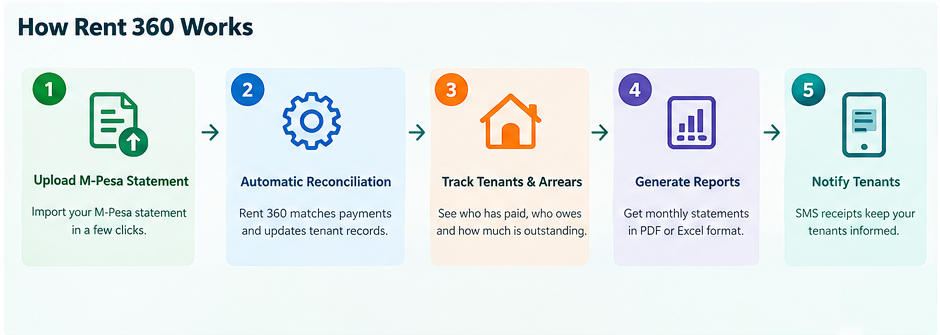
Illustrative concept of the Rent 360 workflow and interface, not a screenshot of a live account.
Bring payment transactions together as the starting point for checking and organising rental income.
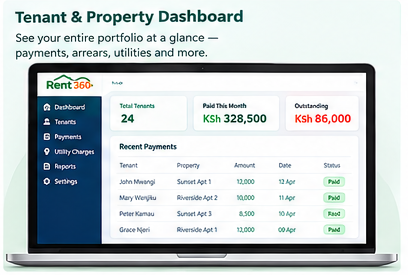
See tenant records, payments received and outstanding balances in a clearer overview.
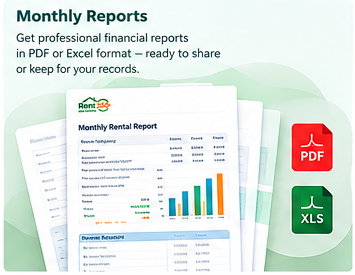
Organise rental summaries for review and record keeping in practical report formats.
Rent360 is more than just a receiving money App. Landlords can tell at a click of a button who has paid, what remains outstanding, which utility charges are due and how his property performed over a month or a year etc. Rent 360 brings these tasks into a more organised workflow so you can spend less time sorting records and more time managing your property.
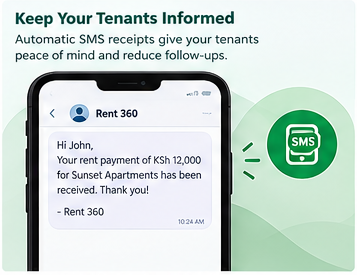
Payment confirmations can help tenants keep track of rent payments and reduce misunderstandings.
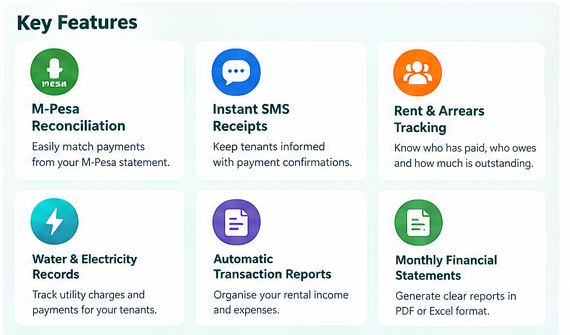
Bring together rent, arrears, utilities and monthly financial summaries.

Spend less time sorting records and more time managing your properties.
Move towards smarter property management with Rent 360. Use your M-Pesa statement as the starting point, organise your rent records, and generate a complete report straight to your phone. Contact Smart Invoices to discuss your property setup and request a demonstration.